

Screens and settings
Catalogue Record
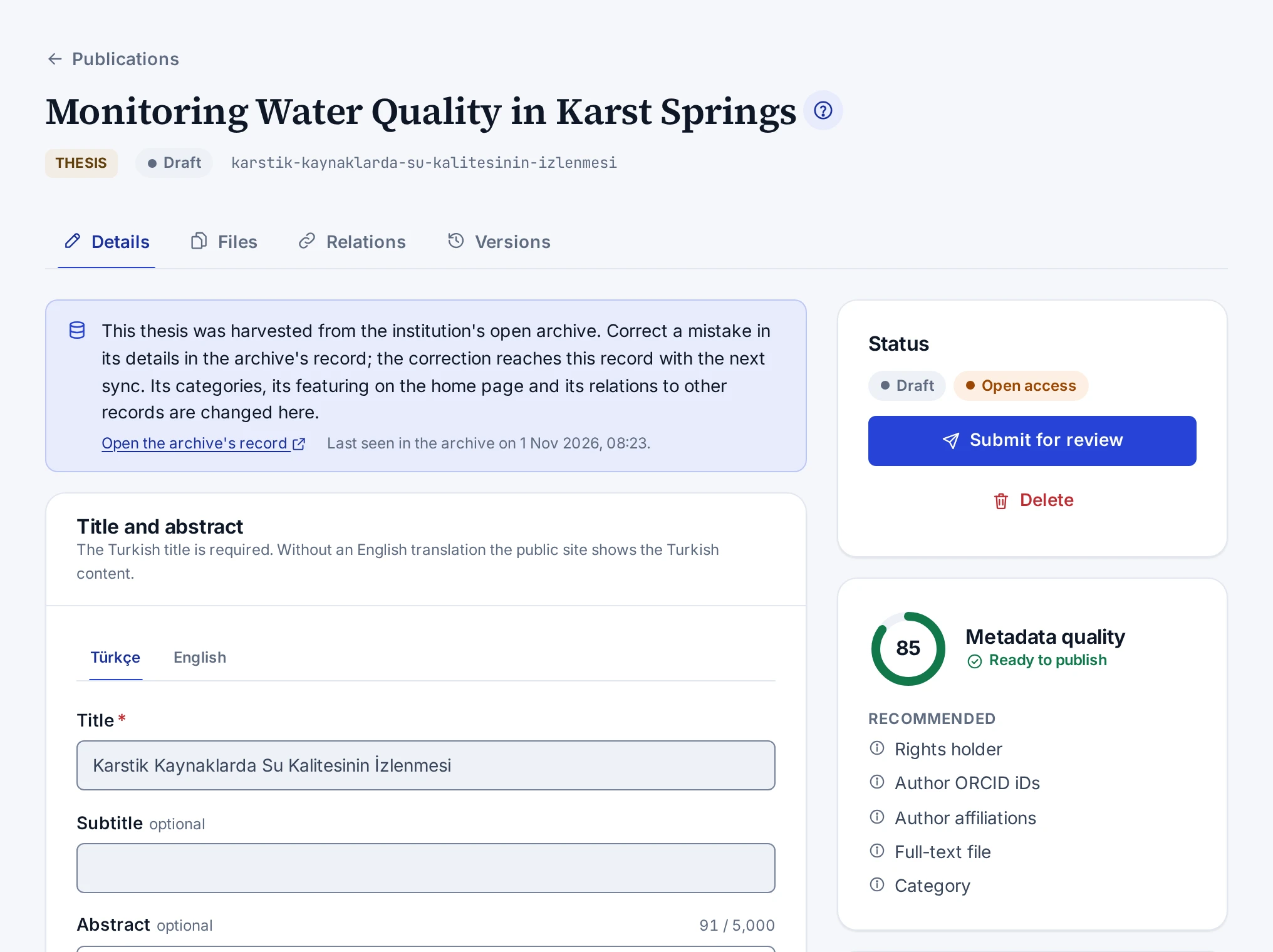
The page of a catalogue record, its tabs, the status, quality and record information cards on the right, and the save bar.
The page of a catalogue record shows all of the record's details, files, relations and versions together. You open the page by pressing the record's title in the Publications list. Next to the title you see the record's type, status, slug and any missing translation.
Tabs
| Tab | Contents |
|---|---|
| Details | Title and abstract, contributors, type-specific information, basic information, categories, identifiers, access and licence |
| Files | Full text, cover and supplementary files, the files' access and their earlier versions |
| Relations | Book and chapter, translation, supplement, new edition, correction and retraction relations |
| Versions | The record's version history, comparison and going back to an earlier version |
Cards on the right
- The Status card shows the record's status and access, the link to the public page and the actions open in that status. For a record in review it also shows who sent it for review and when.
- For a retracted or corrected record, a separate card shows the Retraction notice or Correction notice text with its date.
- The Metadata quality card shows the quality score out of 100, whether the record is ready to publish, and the Required and Recommended gaps. For articles the TR Dizin data checks warnings are here too.
- The Record information card has the time of creation, last update and first publication, the record's version number and, for an imported record, a link to the import. For the types that support it, the Download Crossref XML button and the Crossref DOI registration line are on this card too.
- On book, children's book, proceedings paper and thesis records, people with an ISBN permission see the ISBN requests card.
Save bar
When you change a field on the Details tab, a bar that says "There are unsaved changes" opens at the bottom. Save changes saves the changes, and Discard changes returns to the last saved state. The Ctrl+S shortcut (Cmd+S on a Mac) also saves. If you try to leave the page without saving, the panel asks you to confirm first.
Rules of the screen
- While there are unsaved changes, the status buttons and the Restore buttons on the Versions tab are disabled.
- While a status action runs, the other status buttons are disabled. If you press Save changes meanwhile, your changes are saved once the action is done. What you type while the action runs is not lost.
- If you have no permission to edit the catalogue, the record is view-only and a note at the top of the page says so.
- A retracted record cannot be changed. A deleted record cannot be edited until it is restored.
- On a thesis harvested from the institutional repository, a note at the top of the form says it came from the repository. The fields and files that come from the repository cannot be changed, and an earlier version cannot be restored. The categories, featuring and relations can be changed. The details are in Harvested Theses.
- If someone else changed the record while you were editing, saving stops and the "Someone else changed this record" window opens. Reload the page with Reload and make your change again.