

Screens and settings
Publications
The list of catalogue records with its search box, filters, columns, row menu and bulk action bar.
The Catalogue → Publications screen lists all draft, in-review and published records in the catalogue. Opening a new record, finding a record and applying the same action to several records all start here.
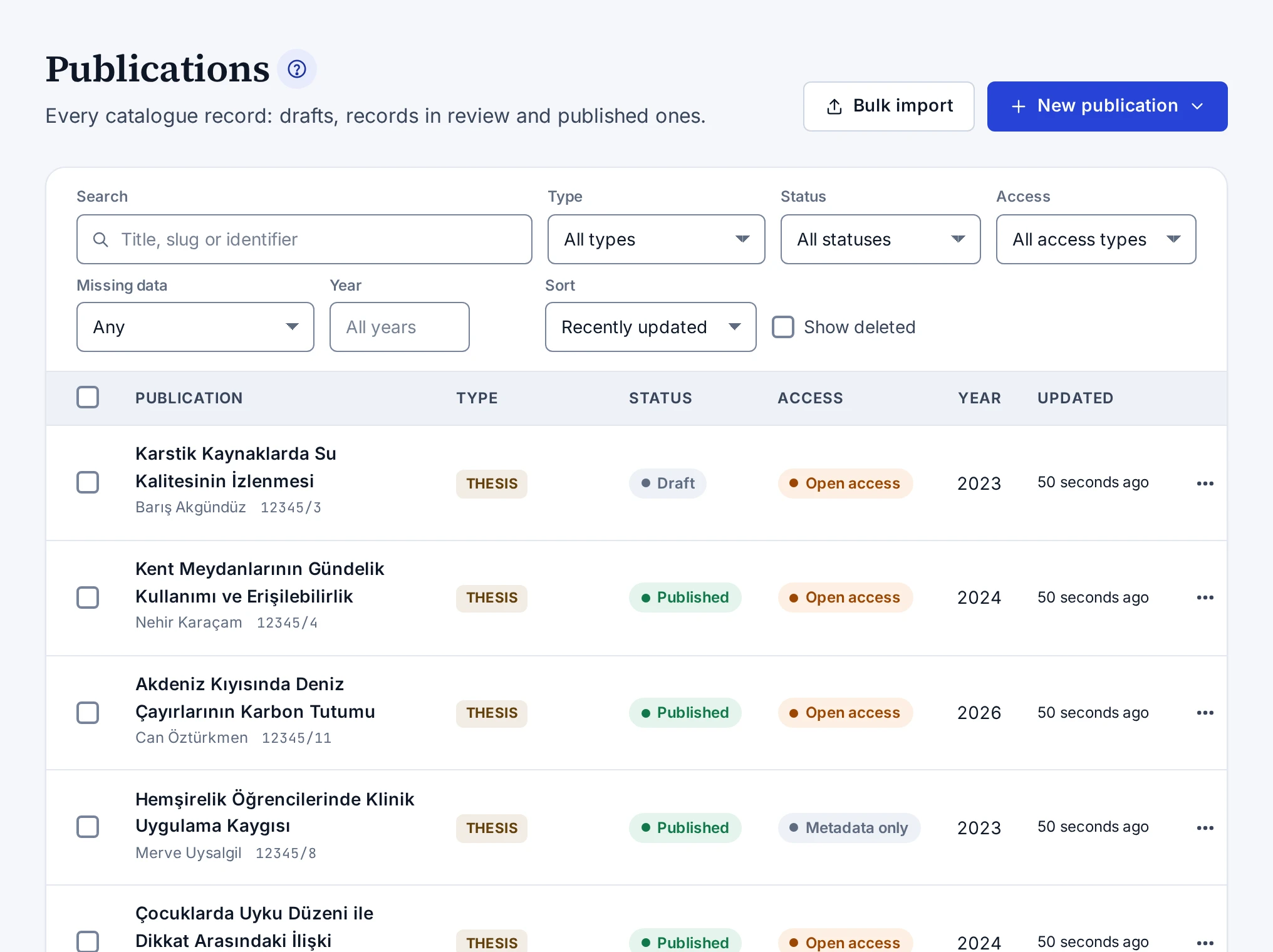
Buttons at the top
- New publication opens a new record of the type you select and needs the catalogue edit permission.
- Bulk import opens the bulk import screen and needs the bulk import permission.
Search and filters
The search box searches the record's titles and subtitles in every language and its slug. Turkish letters do not matter, and a search for "isik" also finds a draft titled "Işık". The characters % and _ are searched as they are typed, so a search for "50%" finds only titles that contain "50%". The filters are these:
| Filter | Options |
|---|---|
| Type | The seven record types |
| Status | Draft, In review, Published, Archived, Retracted |
| Access | Open access, Metadata only, Embargoed, Restricted |
| Missing data | No licence, No category, No abstract, No English translation |
| Year | A four-digit publication year |
| Sort | Recently updated, Recently added, By slug (A–Z), Year (newest first), Year (oldest first) |
| Show deleted | Records in the trash |
The filters stay in the address bar. If you share the link, the same list opens. If you come from a category's menu on the Categories screen, the list is filtered by that category.
Columns
| Column | What it shows |
|---|---|
| Publication | Title, authors and the first identifier. A missing translation, a deleted record and a record you sent for review are marked with a label |
| Type | The record's type |
| Status | The record's status |
| Access | Access status |
| Year | Publication year |
| Updated | Time of the last change |
Row menu
The menu at the end of a row shows the actions that suit the record's status:
- Edit opens the record's page.
- In draft, Submit for review and Delete appear.
- In review, Publish, Return to draft and Delete appear.
- When published, Archive and Unpublish appear.
- For public records, Open the public page opens the record's page on the public site.
- For a deleted record, only Undo delete appears.
If the editor approval rule is on in your installation and you sent the record for review, the Publish (another editor publishes it) item in the menu is disabled.
Bulk action bar
When you select rows with the boxes on the left, the bulk action bar opens above the list. The bar has the Submit for review, Publish, Return to draft, Unpublish and Archive buttons. The steps are in Bulk Actions. When you change the page or the filters, the selection is cleared.