

Screens and settings
Editor Queue
The quick filters, filters, columns and sorting of the screen where editors follow submissions.
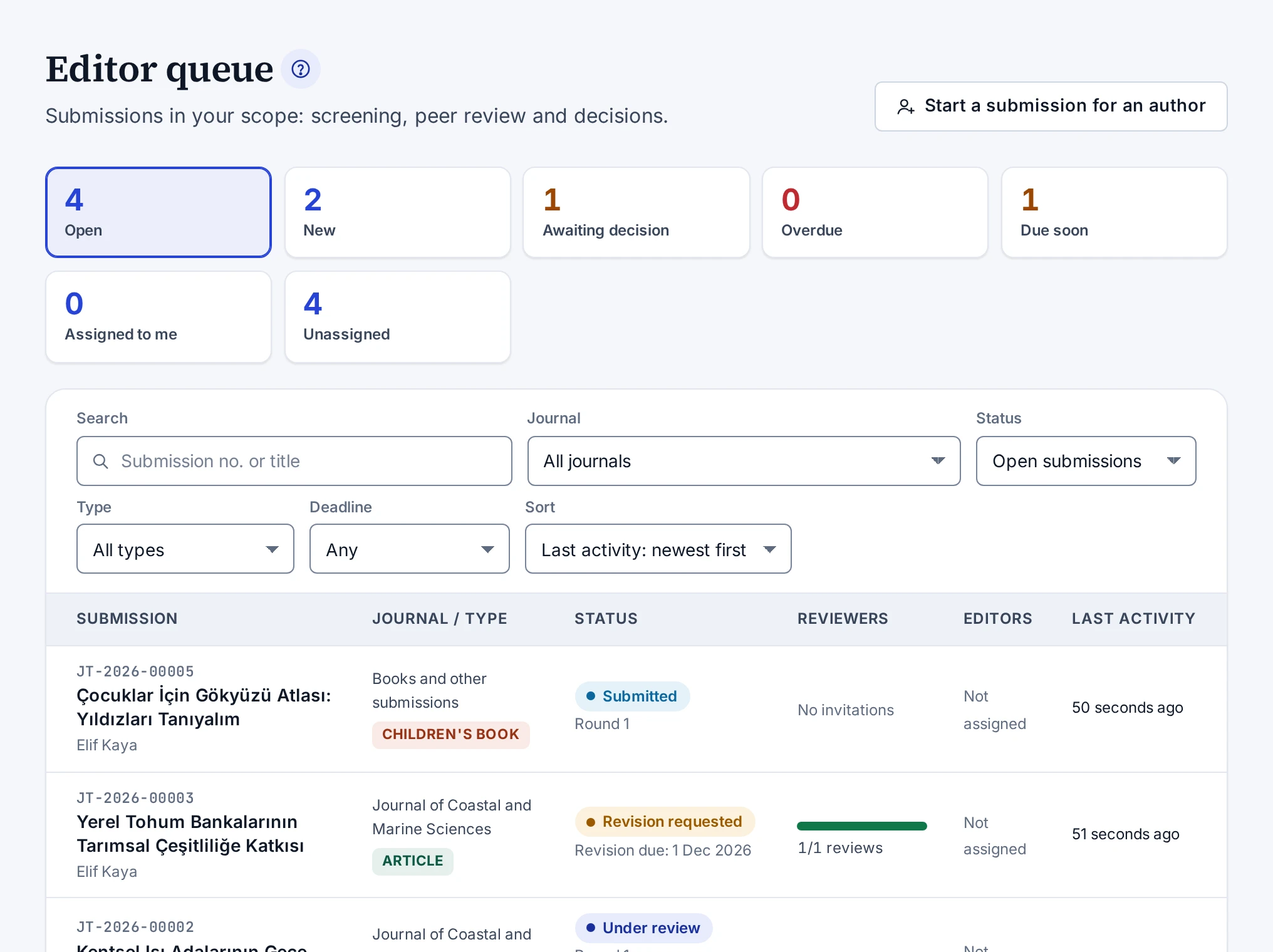
The Editorial → Editor queue screen lists the submissions within your scope. If your role was granted for one journal, you see only the submissions of that journal. Submissions you are an author of are not in the list. Drafts do not appear in the queue either. A submission enters the queue when the author submits it.
Quick filters
The boxes above the list, with their counts, are quick filters. Pressing a box narrows the list to those submissions.
| Box | Submissions it shows |
|---|---|
| Open | All submissions without a final outcome |
| New | Submissions that are submitted or in screening |
| Awaiting decision | Submissions under review and submissions with a submitted revision |
| Overdue | Submissions where the deadline for a reviewer response, a review or a requested revision has passed |
| Due soon | Submissions where one of these deadlines falls within 7 days |
| Assigned to me | Open submissions assigned to you |
| Unassigned | Open submissions without an assigned editor |
Filters
The Filters section has the following filters:
- The Submission no. or title box searches the submission number and the title.
- In the Journal list, editors authorised for the whole platform also see the Without a journal (books, chapters, theses …) option.
- The Status and Type lists narrow the submissions by status and by type.
- The Deadline list shows submissions whose deadline falls within 3, 7, 14 or 30 days. Overdue submissions are not in this list but in the Overdue box.
The filters stay in the address bar. If you share the link, the same list opens.
Sorting
The Sort list sorts by last activity, by submission date or by deadline. By default the list is sorted by last activity. The Deadline: nearest first option puts overdue submissions at the top and submissions without a deadline at the bottom.
Columns
| Column | What it shows |
|---|---|
| Submission | Submission number, title and the name of the submitter |
| Journal / type | The journal of the submission or Books and other submissions, and the publication type |
| Status | Status, the Overdue label if any, the review round or the revision deadline, and the nearest reviewer deadline |
| Reviewers | The number of reviews received and the number of invitations in the current round. Hovering over it shows how many reviewers are awaiting a response, reviewing or have declined |
| Editors | The assigned editors or Not assigned |
| Last activity | The time of the last activity on the submission |
Submitting on behalf of an author
Only people with the permission to start submissions on behalf of authors see the Start a submission for an author button. The screen it opens is described in Submitting on Behalf of an Author.
When you open a submission, the Next step card tells you what to do at that moment. The parts of the submission screen are described in Editor Submission Screen.