

Screens and settings
Thesis Harvest Screen
The status card, the harvest buttons, the source settings, the list of recent runs and the transfer report of the thesis harvest screen.
The Catalogue → Thesis harvest screen is where you set up, start and follow the harvest of theses from the institution's open repository. The screen needs the Bulk import (CSV, XLSX, JSON) permission. Only people with the Manage site settings and feature flags permission change the source settings. Everyone else sees them read-only.
The Transfer report (CSV) button at the top of the screen downloads the transfer report. Its columns are listed at the end of this topic.
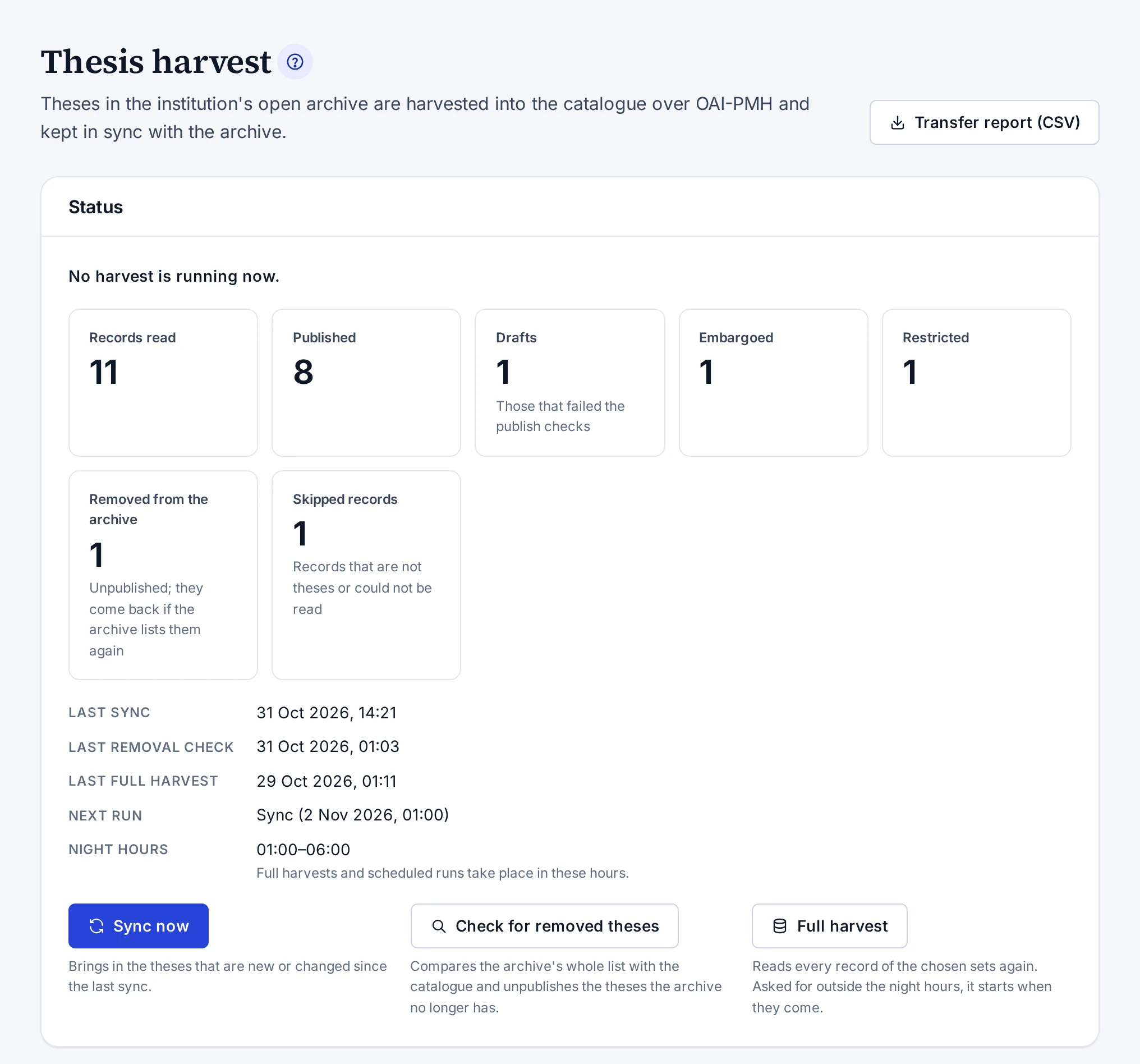
Status
The first line of the Status card says where the harvest stands. While a run is going on, the screen refreshes itself every few seconds.
| Count | Meaning |
|---|---|
| Records read | Every record seen in the chosen sets |
| Published | Imported theses that are published in the catalogue |
| Drafts | Theses that stay drafts because they did not pass the publishing checks |
| Embargoed | Theses whose embargo is still running in the repository |
| Restricted | Theses with restricted access in the repository |
| Removed from the archive | Theses unpublished because they were removed from the repository |
| Skipped records | Records not imported because they are not theses or could not be read |
Under the counts you see when the last full harvest, sync and check for removals finished. The Next run line shows the system's next run and the earliest time it starts. The Night hours line shows the hours in which full harvests and scheduled runs take place.
Harvest buttons
| Button | What it does |
|---|---|
| Sync now | Brings the theses that are new or changed in the repository since the last sync. |
| Check for removed theses | Compares the repository's whole list with the catalogue and unpublishes the theses the repository no longer has. |
| Full harvest | Reads every record in the chosen sets again. |
Sync now and Check for removed theses stay disabled until the first full harvest has finished. While a run is going on, or while the harvest is switched off, all three buttons are disabled. The note under a button gives the reason.
Check for removed theses asks for confirmation first. A check started by hand unpublishes every thesis that is missing from the repository's list. The safety limit of the scheduled check does not apply to it. The limit is explained in Full Harvest and Sync.
If you press Full harvest outside the night hours, the harvest starts when they come. The screen tells you when it starts.
Source settings
| Field | Meaning |
|---|---|
| Harvest on | While it is on, the scheduled runs take place. |
| OAI-PMH address | The repository's OAI-PMH address. The Check the source button checks it. |
| Metadata format | The record format the harvest reads. The recommended format is marked. |
| Sets | The sets the theses are imported from. The list shows the sets the last check read and the date of that check. |
| Full text | Whether readers reach the full text in the repository or the file is copied here |
| Original page | The page search engines treat as the original |
| Institution name | The name of the university that awards the degrees. It goes into the institution field of the imported theses. |
| Its entry in the institution tree | The university's record in the institution tree. The list shows with the Create and edit persons and institutions permission. |
How to fill in the fields is explained in Setting Up the Thesis Harvest.
Recent runs
The Recent harvests table lists the last ten runs. The Kind column shows the kind of run, and Started shows when it started and who started it. Result shows the main counts above zero.
The row of a run started by hand gives the name of the person who started it. A full harvest asked for outside the night hours shows the name of the person who asked for it. A run the system started by itself shows Scheduled. If the account of the person who started it was deleted, Started by a user takes the place of the name.
The Details button of a row opens all the counts of the run, the records by set and the problems.
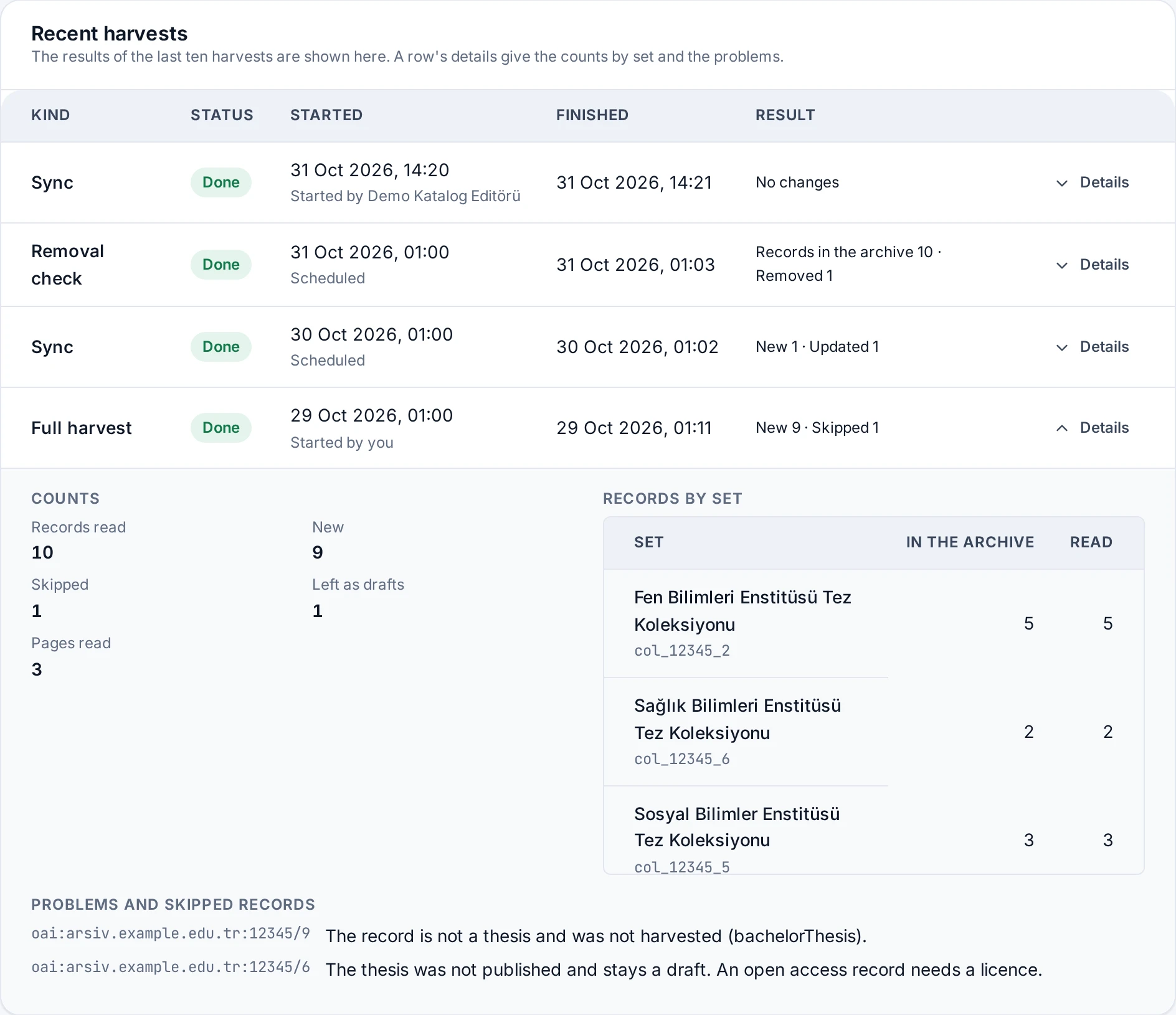
| Count | Meaning |
|---|---|
| Records in the archive | Records the repository listed in a check for removals |
| Records read | Records read in this run |
| New | Theses newly created in the catalogue |
| Updated | Theses updated because they changed in the repository |
| Unchanged | Theses skipped because they did not change in the repository |
| Removed | Theses unpublished because they were removed from the repository |
| Back again | Theses that came back because the repository lists them again |
| Skipped | Records not imported because they are not theses or could not be read |
| Left as drafts | Theses that stay drafts because they did not pass the publishing checks |
| Embargo lifted | Theses that became open access because their embargo ended |
| Files copied | Full texts copied |
| Files to try again | Full texts the repository did not give at the moment, to be asked for again later |
| Errors | Problems found in records |
| Pages read | Pages read from the repository |
The Records by set table shows, for every set, how many records the repository reports next to how many the run read. When the two differ, the row shows a warning sign.
The Problems and skipped records list gives each problem's record identifier and its cause. The list shows the first twenty problems. If there are more, the Show all problems button opens up to a hundred. How to solve them is explained in Thesis harvest looks failed.
Transfer report
The Transfer report (CSV) button downloads a CSV file with one row for every record the harvest knows. The file opens in a spreadsheet with Turkish characters intact.
| Column | Content |
|---|---|
oai_identifier |
The record's OAI identifier in the repository |
source_url |
The record's page in the repository |
title |
The thesis title |
level |
The kind of thesis (ms master's, phd doctoral, art proficiency in art, medical medical specialty) |
year |
The thesis year |
status |
published, draft, removed (removed from the repository), skipped (not imported), deleted (deleted in the catalogue) |
access |
The access status |
embargo_until |
When the embargo ends |
local_url |
The address of a published thesis on this site |
note |
Why the thesis stays a draft, was skipped or was removed |