

Screens and settings
Reviewing Screen
The tabs and rows of the screen where reviewers follow their invitations, their reviews in progress and the reviews they completed.
The Author & reviewer → Reviewing screen lists the invitations you received and your reviews. This section appears in the menu if you have the reviewer role or have received at least one invitation.
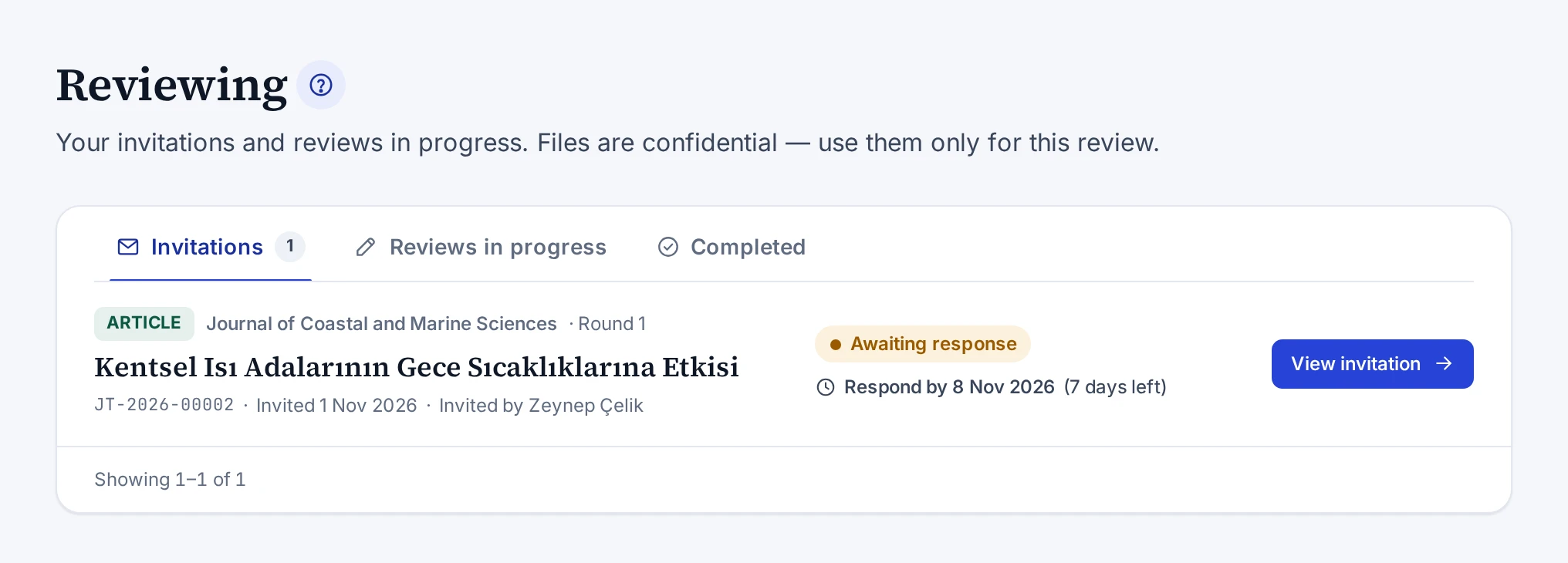
Tabs
| Tab | What it shows |
|---|---|
| Invitations | Invitations awaiting your response. The number on the tab is the number of pending invitations |
| Reviews in progress | Reviews you accepted and have not submitted yet. The number on the tab is their count |
| Completed | Reviews you have submitted |
The reviews are sorted by review deadline. If you have no pending invitation and a review in progress, the screen opens on the Reviews in progress tab. Invitations you declined, expired invitations and invitations the editor closed are not listed.
Rows
Each row shows the publication type, the journal or publisher, the round and the title of the work. The submission number appears under the title. Invitations show the invitation date and the editor who sent the invitation. Completed reviews show the date the review was submitted.
On the right of the row are the status label and the next deadline. An invitation shows the last day to respond. A review you accepted shows the last day for the review. Next to the date is the number of days left or overdue. Dates with three days or less left and past dates are highlighted in colour.
| Button | When it appears |
|---|---|
| View invitation | For an invitation awaiting your response |
| Start review | For a review you accepted but have not started in the form |
| Continue review | For a review saved as a draft |
| View report | For a submitted review |
Empty list
If you have no pending invitations, the tab says so. If you do not have the reviewer role, a note reminding you to join the reviewer pool and a Go to my profile link appear at the bottom of the screen. Joining the pool is described in Joining the Reviewer Pool.
The screen that opens when you open an invitation is described in Review Invitation Screen.